Debugging Log - [B.C. Ch3 Assignment4] Pawn 클래스 3D 캐릭터 만들기
[B.C. Ch3 Assignment4] Pawn 클래스 3D 캐릭터 만들기
미리 구현된 Character 클래스 대신, Pawn에서부터 직접 컴포넌트를 구성하고, 최신 Enhanced Input 시스템을 통해 입력 데이터를 처리하며, 캐릭터가 월드를 자유롭게 누비는 로직을 직접 설계. Pawn 클
devcol.tistory.com
코드에서 EnhancedInputComponent 는 들어와 지는데, MoveAction 는 false 가 계속 나오는 상황.
```cpp
void APawnBaseCharacter::SetupPlayerInputComponent(UInputComponent* PlayerInputComponent)
{
	Super::SetupPlayerInputComponent(PlayerInputComponent);

	UEnhancedInputComponent* EnhancedInputComponent =
	Cast<UEnhancedInputComponent>(PlayerInputComponent);

	if (EnhancedInputComponent)
	{
		if (MoveAction)
		{
			EnhancedInputComponent->BindAction(
				MoveAction,
				ETriggerEvent::Triggered,
				this,
				&APawnBaseCharacter::Move
			);
		}

		if (LookAction)
		{
			EnhancedInputComponent->BindAction(
				LookAction,
				ETriggerEvent::Triggered,
				this,
				&APawnBaseCharacter::Look
			);
		}
	}
}
```
전체 코드 다 다시 봐도 분명 문제가 없어 보여서강의 영상 및 AI 확인 해 봤더니 엔진쪽에서 Key Binding을 안해서 그런거였었다.
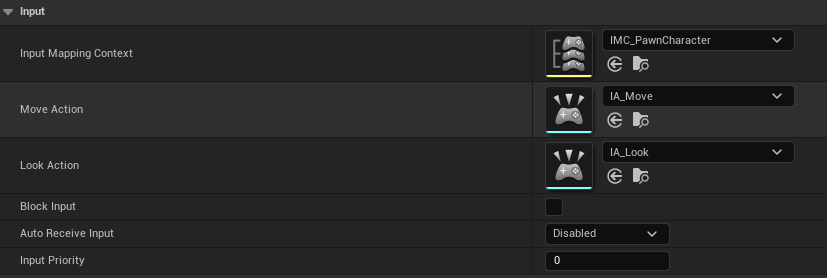
보통은 PlayerController 에 연결하는데 이번 과제에서 원하는건 그게 아니여서 순간 까먹었다.
GetCharacterMovement() 가 안되는 문제
#include "GameFramework/CharacterMovementComponent.h"
GetCharacterMovement()->MaxWalkSpeed = NormalMoveSpeed;
Error 가 뜨는 상황.
알아보니, GetCharacterMovement()는 ACharacter 클래스 전용 함수 였다.그리고 현재 내 클래스는 APawn을 상속받은 함수라 사용 할수가없다.
또한 Tick 으로 캐릭터를 움직일경우 StopMove & Loock 도 만들어줘야 한다 안그러면 마지막 Input 의 값으로 계속 반영된다.
CheckGrounded() 코드
문제가 생긴건 아니였지만, 강의에 없던 내용 인터넷에서 찾으거여서 조금 해맸었다.
bool AAircraftPawnBaseCharacter::CheckGrounded()
{

	FVector StartLocation = GetActorLocation();
	FVector DownVector = -GetActorUpVector();

	float TraceDistance = 50.f;
	FVector EndLocation = StartLocation + (DownVector * TraceDistance);

	float CollisionRadius = 40.f;
	FCollisionShape SphereShape = FCollisionShape::MakeSphere(CollisionRadius);


	FHitResult HitResult;
	FCollisionQueryParams QueryParams;
	QueryParams.AddIgnoredActor(this);

	bool bHit = GetWorld()->SweepSingleByChannel(
		HitResult,
		StartLocation,
		EndLocation,
		FQuat::Identity,
		ECC_Visibility,
		SphereShape,
		QueryParams
	);

	// [선택 사항] 에디터에서 충돌 영역을 눈으로 확인하고 싶을 때 사용
	DrawDebugSphere(GetWorld(), EndLocation, CollisionRadius, 12, FColor::Orange, false, -1.f);

	// 내가 Ground 에 있는거 더 확실하게 보여주기 위해서 StaticMesh를 하나 더 추가 했었다.
	StaticMeshComponent_Ground->SetVisibility(bHit);

	return bHit;
}
느낀 점 / 깨달은 점
코드로 엔진 과 연결할 경우 꼭 엔진에 가서 연결 확인하자 !!!
추천
[Unreal Engine/Project] - [B.C. Ch3 Assignment4] Pawn 클래스 3D 캐릭터 만들기
[B.C. Ch3 Assignment4] Pawn 클래스 3D 캐릭터 만들기
미리 구현된 Character 클래스 대신, Pawn에서부터 직접 컴포넌트를 구성하고, 최신 Enhanced Input 시스템을 통해 입력 데이터를 처리하며, 캐릭터가 월드를 자유롭게 누비는 로직을 직접 설계. Pawn 클
devcol.tistory.com
[페이지] Unreal Engine | 언리얼 엔진