UI 애니메이션 효과 및 3D 위젯 UI 구현하기
UI 애니메이션 효과 디자인하기
1️⃣ UMG와 Animation에 대해 이해하기
- 언리얼 엔진에서는 UI를 만들 때 주로 UMG (언리얼 모션 그래픽스, Unreal Motion Graphics)를 사용합니다. UMG에는 Animation 기능이 탑재되어 있어, 예를 들어 버튼이 클릭될 때 색이 바뀌거나, 텍스트가 화면 위로 등장했다가 사라지는 등 다양한 연출을 쉽게 구현할 수 있습니다.
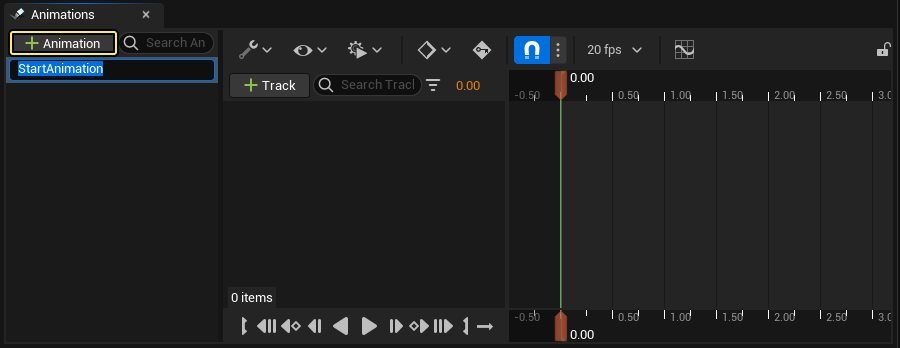
- Animation 패널
- UMG 에디터 내에서 메뉴 상단에서 Window - Animations를 클릭하면 애니메이션을 다루는 창이 뜹니다.
- UMG 에디터 왼쪽 하단 (기본 레이아웃 기준)에 위치한 패널입니다.
- 여기서 새 애니메이션을 생성하거나, 이미 만든 애니메이션을 선택해 타임라인을 확인할 수 있습니다.
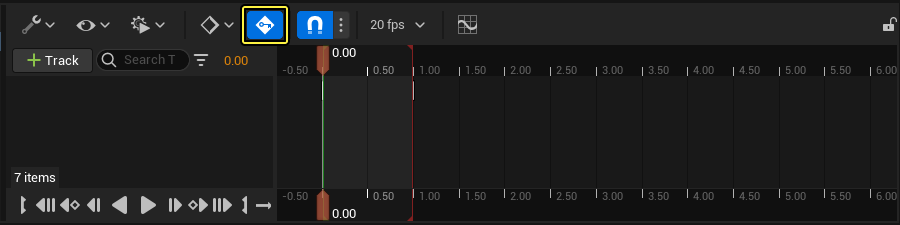
- Keyframe(키 프레임)
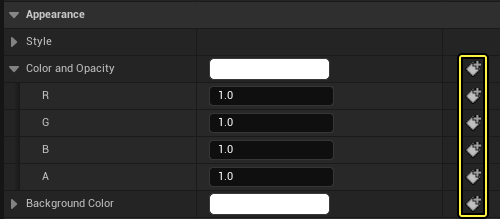
- 특정 시간대에 UI 속성(크기, 위치, 투명도, 색상 등)을 어떻게 바꿀지를 기록하는 지점입니다.
- 여러 개의 키 프레임을 연결하여 하나의 애니메이션 타임라인을 완성합니다.
UMG 위젯 애니메이팅 UE 공식 문서: https://dev.epicgames.com/documentation/unreal-engine/animating-umg-widgets-in-unreal-engine?lang=ko
Animating UMG Widgets in Unreal Engine | Unreal Engine 5.7 Documentation | Epic Developer Community
How to create animated UI elements in UMG in Unreal Engine.
dev.epicgames.com
UMG UI 디자이너 퀵스타트 가이드 UE 공식 문서: https://dev.epicgames.com/documentation/unreal-engine/umg-ui-designer-quick-start-guide-in-unreal-engine?lang=ko
UMG UI Designer Quick Start Guide in Unreal Engine | Unreal Engine 5.7 Documentation | Epic Developer Community
Getting started with using Unreal Motion Graphics in Unreal Engine.
dev.epicgames.com
2️⃣ Text 위젯에 애니메이션 적용하기
- 이제 실제로 “Game Over” 텍스트를 사용해 화면에 서서히 떠올랐다가 사라지는 연출을 만들어 봅시다.
- 위젯 블루프린트 내에서 텍스트 배치하기
- WBP_MainMenu를 열어서 디자이너 화면에 TextBlock 하나를 추가해 이름을 GameOverText 라고 하고, 또 하나 TextBlock을 추가해 이름을 TotalScoreText 라고 합시다.
- 두 TextBlock 모두 기본 Text를 설정해줍니다. (Content - Text 카테고리에 입력)
- 평소에는 GameOverText와 TotalScoreText를 Hidden (또는 Opacity=0) 상태로 배치합니다.
- 이 텍스트가 게임 시작 시 바로 보이지 않도록, TextBlock의 Visibility를 Hidden 으로 설정해 둡니다. 우리는 애니메이션으로 텍스트를 천천히 보이게 할 것이므로, 기본 상태를 숨기는 편이 좋습니다.
- 애니메이션 트랙 생성
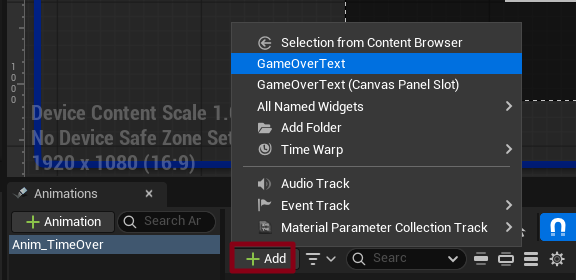
- 에디터 왼쪽 하단의 Animation 패널에서 + Animation 버튼을 클릭해 새 애니메이션을 만듭니다. “Anim_TimeOver” 라고 이름을 붙입니다.

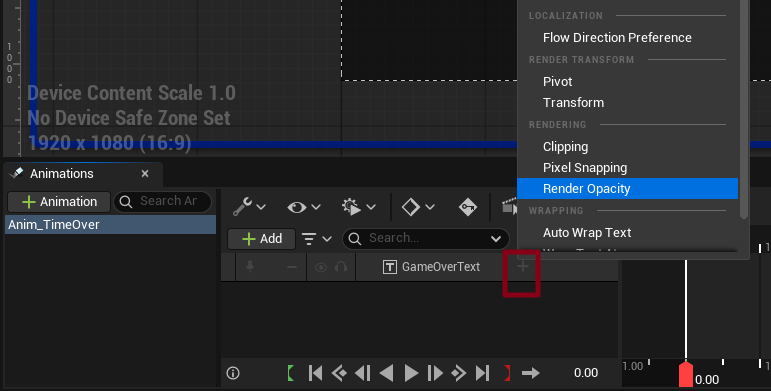
- 아래쪽 타임라인 영역에서 Track을 추가할 수 있는데, 여기서 + Add 를 클릭하고 GameOverText를 선택합니다.
- Keyframe (키 프레임) 설정
- 추가된 GameOverText에서 옆에 희미하게 보이는 + 버튼을 누르면 추가할 수 있는 트랙들이 있습니다. 여기서 Render Opacity (투명도)를 트랙에 추가하여, 이 값이 시간에 따라 어떻게 변하는지 기록할 수 있도록 설정합니다.
- 시간 바를 옮기면서 각각 Render Opacity 값을 변경하면 자동으로 트랙에 Key가 등록됩니다.
3️⃣ 애니메이션을 Blueprint 재생 함수로 묶어두기
- 우리는 이 애니메이션을 재생하기 위해서는 그 동안의 작성한 게임 로직들 즉, C++에서 UMG의 애니메이션 재생이라는 흐름이 필요합니다. C++에서 블루프린트의 함수를 호출해야하는 반대 상황인것입니다.
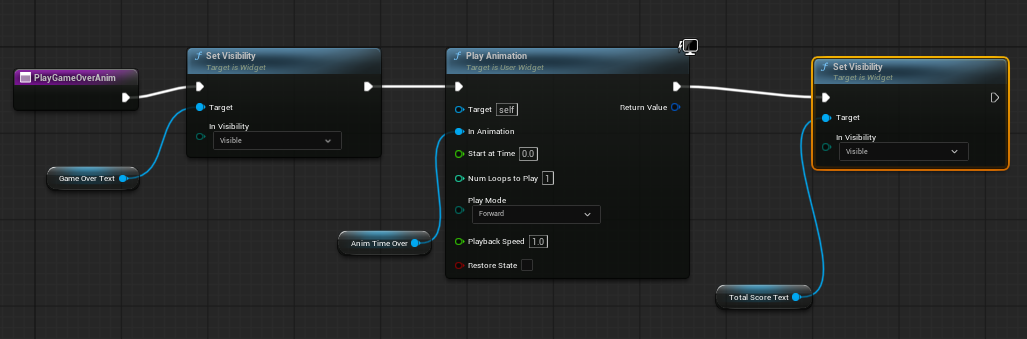
- 이벤트 그래프에서 PlayGameOverAnim Function을 만들어줍니다.
- 시작시 GameOverText을 visible로 처리하고, Play Animation을 연결합니다. 즉, “PlayTimeOverAnim”을 호출하면 “Anim_TimeOver” 애니메이션이 재생되도록 구성합니다.
- 애니메이션 재생이 끝나면 자연스럽게 점수가 뜰 수 있도록, TotalScoreText 를 visible 처리를 하도록 연결해줍니다.
게임 오버 UI 애니메이션 효과 추가하기
#include "MainPlayerController.h"
#include "EnhancedInputSubsystems.h"
#include "EnhancedInputSubsystems.h" // Enhanced Input System의 Local Player Subsystem을 사용하기 위해 포함
#include "MainGameState.h"
#include "MainGameInstance.h"
#include "Blueprint/UserWidget.h"
#include "Kismet/GameplayStatics.h"
#include "Components/TextBlock.h"

// 어차피 블루프린트 상에서 전부 다 초기화를 하기 때문에 여기서는 전부 다 nullptr 처리
AMainPlayerController::AMainPlayerController()
	: InputMappingContext(nullptr),
	  MoveAction(nullptr),
	  JumpAction(nullptr),
	  LookAction(nullptr),
	  SprintAction(nullptr),
	  HUDWidgetClass(nullptr),
	  HUDWidgetInstance(nullptr),
	  MainMenuWidgetClass(nullptr),
	  MainMenuWidgetInstance(nullptr)

{
}

void AMainPlayerController::BeginPlay()
{
	Super::BeginPlay();

	// GetLocalPlayer():현재 PlayerController에 연결된 Local Player 객체를 가져옴
	// Local Player 는 그 플레이어의 입력이나 화면 뷰 같은 것을 관리하는 어떤 객체
	if (ULocalPlayer* LocalPlayer = GetLocalPlayer())
	{
		// Local Player에서 EnhancedInputLocalPlayerSubsystem을 획득
		// UEnhancedInputLocalPlayerSubsystem: 입력 시스템을 관리 (IMC 추가 혹은 삭제하는 역할)
		if (UEnhancedInputLocalPlayerSubsystem* Subsystem =
			LocalPlayer->GetSubsystem<UEnhancedInputLocalPlayerSubsystem>())
		{
			if (InputMappingContext)
			{
				// Subsystem을 통해 우리가 할당한 IMC를 활성화
				// 우선순위(Priority)는 0이 가장 높은 우선순위
				Subsystem->AddMappingContext(InputMappingContext, 0);
			}
		}
	}

	FString CurrentMapName = GetWorld()->GetMapName();
	if (CurrentMapName.Contains("MenuLevel"))
	{
		ShowMainMenu(false);
	}


	/*// HUD 위젯 생성 및 표시
	if (HUDWidgetClass)
	{
		HUDWidgetInstance = CreateWidget<UUserWidget>(this, HUDWidgetClass);
		if (HUDWidgetInstance)
		{
			HUDWidgetInstance->AddToViewport();
		}
	}

	AMainGameState* MainGameState = GetWorld() ? GetWorld()->GetGameState<AMainGameState>() : nullptr;
	if (MainGameState)
	{
		MainGameState->UpdateHUD();
	}*/
}

UUserWidget* AMainPlayerController::GetHUDWidget() const
{
	return HUDWidgetInstance;
}


// 메뉴 UI 표시
void AMainPlayerController::ShowMainMenu(bool bIsRestart)
{
	// HUD가 켜져 있다면 닫기
	if (HUDWidgetInstance)
	{
		HUDWidgetInstance->RemoveFromParent();
		HUDWidgetInstance = nullptr;
	}

	// 이미 메뉴가 떠 있으면 제거
	if (MainMenuWidgetInstance)
	{
		MainMenuWidgetInstance->RemoveFromParent();
		MainMenuWidgetInstance = nullptr;
	}

	// 메뉴 UI 생성
	if (MainMenuWidgetClass)
	{
		MainMenuWidgetInstance = CreateWidget<UUserWidget>(this, MainMenuWidgetClass);
		if (MainMenuWidgetInstance)
		{
			MainMenuWidgetInstance->AddToViewport();

			bShowMouseCursor = true;
			SetInputMode(FInputModeUIOnly());
		}

		if (UTextBlock* ButtonText = Cast<UTextBlock>(
			MainMenuWidgetInstance->GetWidgetFromName(TEXT("StartButtonText"))))
		{
			if (bIsRestart)
			{
				ButtonText->SetText(FText::FromString(TEXT("Restart")));


			}
			else
			{
				ButtonText->SetText(FText::FromString(TEXT("Start")));
			}
		}

		if (bIsRestart)
		{
			UFunction* PlayAnimFunc = MainMenuWidgetInstance->FindFunction(FName("PlayGameOverAnim"));
			if (PlayAnimFunc)
			{
				MainMenuWidgetInstance->ProcessEvent(PlayAnimFunc, nullptr);
			}

			if (UTextBlock* TotalScoreText = Cast<UTextBlock>(MainMenuWidgetInstance->GetWidgetFromName("TotalScoreText")))
			{
				if (UMainGameInstance* MainGameInstance = Cast<UMainGameInstance>(UGameplayStatics::GetGameInstance(this)))
				{
					TotalScoreText->SetText(FText::FromString(
						FString::Printf(TEXT("Total Score: %i"), MainGameInstance->TotalScore)
					));
				}
			}
		}
	}
}

// 게임 HUD 표시
void AMainPlayerController::ShowGameHUD()
{
	// HUD가 켜져 있다면 닫기
	if (HUDWidgetInstance)
	{
		HUDWidgetInstance->RemoveFromParent();
		HUDWidgetInstance = nullptr;
	}

	// 이미 메뉴가 떠 있으면 제거
	if (MainMenuWidgetInstance)
	{
		MainMenuWidgetInstance->RemoveFromParent();
		MainMenuWidgetInstance = nullptr;
	}

	if (HUDWidgetClass)
	{
		HUDWidgetInstance = CreateWidget<UUserWidget>(this, HUDWidgetClass);
		if (HUDWidgetInstance)
		{
			HUDWidgetInstance->AddToViewport();

			bShowMouseCursor = false;
			SetInputMode(FInputModeGameOnly());

			AMainGameState* MainGameState = GetWorld() ? GetWorld()->GetGameState<AMainGameState>() : nullptr;
			if (MainGameState)
			{
				MainGameState->UpdateHUD();
			}
		}
	}
}

// 게임 시작 - BasicLevel 오픈, GameInstance 데이터 리셋
void AMainPlayerController::StartGame()
{
	if (UMainGameInstance* MainGameInstance = Cast<UMainGameInstance>(UGameplayStatics::GetGameInstance(this)))
	{
		MainGameInstance->CurrentLevelIndex = 0;
		MainGameInstance->TotalScore = 0;
	}

	UGameplayStatics::OpenLevel(GetWorld(), FName("BasicLevel"));
	SetPause(false);
}
WidgetComponent로 캐릭터 체력 표시하기
1️⃣ WidgetComponent 개념 이해하기
- WidgetComponent란?
- UMG (언리얼 모션 그래픽스)로 만든 위젯 (텍스트, 이미지, 버튼 등)을 3D 월드에 붙일 수 있게 해주는 컴포넌트입니다.
- 예: “NPC 머리 위 체력바”, “아이템 위에 ‘F 키를 누르세요’ 텍스트” 등이 가능해집니다.
- 언리얼 엔진에서 WidgetComponent를 사용하면, 2D로만 보이던 UI를 공간 내 특정 위치에 붙여 놓고, 카메라 각도에 따라 회전하거나 크기가 달라지는 모습을 만들 수 있습니다.
- WidgetComponent는 Actor에 부착(Attach)할 수 있는 컴포넌트이며, 특정 UUserWidget(UMG Blueprint 클래스)을 3D 상에 표시하게 해 줍니다.
- 보통은 SetWidgetSpace(EWidgetSpace::World)로 설정하여, 월드 공간에 UI가 존재하게 만듭니다.
- 초기 상태에서 SetVisibility(false)로 해 두고, 플레이어가 가까이 왔을 때 SetVisibility(true)로 변경하여 표시할 수 있습니다.
- UMG (언리얼 모션 그래픽스)로 만든 위젯 (텍스트, 이미지, 버튼 등)을 3D 월드에 붙일 수 있게 해주는 컴포넌트입니다.
2️⃣ Widget Blueprint 준비하기
- Contents Browser에서 UI - Widgets 폴더에서 우클릭하고 User Interface > Widget Blueprint로 Parent는 User Widget을 선택해서 새 위젯 블루프린트를 하나 만듭니다. 이름으로 WBP_HP 라고 하겠습니다.
3️⃣ Character 클래스에 WidgetComponent 추가하기
- UI 는 보통 2D 인데 3D 화를 시켜서 사용할 경우 2가지 모드가 있습니다: 스크린 vs 월드
- 스크린: UI 가 화면에 고정 되어 있음. (플레이어의 카메라 방향과 상관없이 항상 정면에서 보인다)
- 월드: 월드의 캐릭터 움직임에 따라서 글씨도 같이 돌아가게 됩니다.
- 여기서는 스크린으로 하겠습니다: OverheadWidget->SetWidgetSpace(EWidgetSpace::Screen);
#pragma once

#include "CoreMinimal.h"
#include "GameFramework/Character.h"
#include "MainCharacter.generated.h"

// 미리 선언
// 전방 선언(Forward Declaration)
class USpringArmComponent; // 스프링 암 관련 클래스 헤더
class UCameraComponent; // 카메라 관련 클래스 전방 선언
class UWidgetComponent;

// Enhanced Input에서 액션 값을 받을 때 사용하는 구조체
struct FInputActionValue;

UCLASS()
class BC_CH3_ASSIGNMENT_5_API AMainCharacter : public ACharacter
{
	GENERATED_BODY()

public:
	// Sets default values for this character's properties
	AMainCharacter();

	virtual void BeginPlay() override;


	UPROPERTY(VisibleAnywhere, BlueprintReadOnly, Category = "Camera")
	USpringArmComponent* SpringArmComp  = nullptr;
	UPROPERTY(VisibleAnywhere, BlueprintReadOnly, Category = "Camera")
	UCameraComponent* CameraComp = nullptr;

	UPROPERTY(EditAnywhere, BlueprintReadOnly, Category = "UI")
	UWidgetComponent* OverheadWidget = nullptr;

	// 현재 체력을 가져오는 함수
	UFUNCTION(BlueprintPure, Category = "Health")
	float GetHealth() const;

	// 체력을 회복시키는 함수
	UFUNCTION(BlueprintCallable, Category = "Health")
	void AddHealth(float Amount);

protected:

	// === Variables ===
	// 최대 체력
	UPROPERTY(EditAnywhere, BlueprintReadWrite, Category = "Health")
	float  MaxHealth;
	// 현재 체력
	UPROPERTY(VisibleAnywhere, BlueprintReadWrite, Category = "Health")
	float  Health;

	// = Movements
	UPROPERTY(EditAnywhere, BlueprintReadWrite, Category = "Movement")
	float NormalSpeed; // 기본 걷기 속도

	UPROPERTY(EditAnywhere, BlueprintReadWrite, Category = "Movement")
	float SprintSpeedMultiplier;  // "기본 속도" 대비 몇 배로 빠르게 달릴지

	UPROPERTY(VisibleAnywhere, BlueprintReadOnly, Category = "Movement")
	float SprintSpeed; 	// 실제 스프린트 속도 SprintSpeed= NormalSpeed * SprintSpeedMultiplier


	// =====

	// Called to bind functionality to input
	virtual void SetupPlayerInputComponent(class UInputComponent* PlayerInputComponent) override;

	UFUNCTION()
	void Move(const FInputActionValue& value);

	UFUNCTION()
	void Look(const FInputActionValue& value);

	// on off 의 형태의 것들은 그냥 나눠 주는 것이 좋다
	// 왜냐하면 이전에는 세세하게 처리하기가 상당이 까다로웠는데
	// EnhancedInputSystem은 그것들을 매우 편하게 변경해주었기 때문에 왠만하면 나눠 주는 것이 좋다
	UFUNCTION()
	void StartJump(const FInputActionValue& value);
	UFUNCTION()
	void StopJump(const FInputActionValue& value);

	UFUNCTION()
	void StartSprint(const FInputActionValue& value);
	UFUNCTION()
	void StopSprint(const FInputActionValue& value);


	// 사망 처리 함수 (체력이 0 이하가 되었을 때 호출)
	UFUNCTION(BlueprintCallable, Category = "Health")
	virtual void OnDeath();

	void UpdateOverheadHP();

	// 데미지 처리 함수 - 외부로부터 데미지를 받을 때 호출됨
	// 또는 AActor의 TakeDamage()를 오버라이드
	virtual float TakeDamage(
		float DamageAmount,
		struct FDamageEvent const& DamageEvent, // Damage 관련 추가 정보 (예: Skill 속성에 따른 반응)
		AController* EventInstigator, //데미지를 발생 시킨 주체
		AActor* DamageCauser // 데미지를 일으킨 오브젝트
		) override;

};
#include "MainCharacter.h"
#include "EnhancedInputComponent.h"
//#include "InputActionValue.h"
#include "MainPlayerController.h"
// 카메라, 스프링 암 실제 구현이 필요한 경우라서 include
// 전방 선언(Forward Declaration) 한것 여기서 (실질적으로 사용하는곳) 포함
#include "Camera/CameraComponent.h"
#include "GameFramework/SpringArmComponent.h"
//
#include "GameFramework/CharacterMovementComponent.h" // GetCharacterMovement() 사용을 위해
#include "GameFramework/Actor.h"
#include "Components/WidgetComponent.h"
#include "Components/TextBlock.h"
//#include "Kismet/GameplayStatics.h"
AMainCharacter::AMainCharacter()
{
PrimaryActorTick.bCanEverTick = false;
// (1) 스프링 암 생성
SpringArmComp = CreateDefaultSubobject<USpringArmComponent>(TEXT("SpringArm"));
// 스프링 암을 루트 컴포넌트 (CapsuleComponent)에 부착
SpringArmComp->SetupAttachment(RootComponent);
// 캐릭터와 카메라 사이의 거리 기본값 300으로 설정
SpringArmComp->TargetArmLength = 300.0f;
// 컨트롤러 회전에 따라 스프링 암도 회전하도록 설정
SpringArmComp->bUsePawnControlRotation = true;
//
// (2) 카메라 컴포넌트 생성
CameraComp = CreateDefaultSubobject<UCameraComponent>(TEXT("Camera"));
// 스프링 암의 소켓 위치에 카메라를 부착
CameraComp->SetupAttachment(SpringArmComp, USpringArmComponent::SocketName);
// 카메라는 스프링 암의 회전을 따르므로 PawnControlRotation은 꺼둠
CameraComp->bUsePawnControlRotation = false;
OverheadWidget = CreateDefaultSubobject<UWidgetComponent>(TEXT("OverheadWidget"));
OverheadWidget->SetupAttachment(GetMesh());
OverheadWidget->SetWidgetSpace(EWidgetSpace::Screen);
// Movements & Sprint Speed
NormalSpeed = 600.0f;
SprintSpeedMultiplier = 1.75f;
SprintSpeed = NormalSpeed * SprintSpeedMultiplier;
// #include "GameFramework/CharacterMovementComponent.h" 추가해야함
// MaxWalkSpeed 변경시 캐릭터 이동속도가 즉시 변경
GetCharacterMovement()->MaxWalkSpeed = NormalSpeed;
// 초기 체력 설정
MaxHealth = 100.0f;
Health = MaxHealth;
}
void AMainCharacter::BeginPlay()
{
Super::BeginPlay();
UpdateOverheadHP();
}
// Called to bind functionality to input
void AMainCharacter::SetupPlayerInputComponent(UInputComponent* PlayerInputComponent)
{
Super::SetupPlayerInputComponent(PlayerInputComponent);
// Enhanced InputComponent로 캐스팅
if (UEnhancedInputComponent* EnhancedInput = Cast<UEnhancedInputComponent>(PlayerInputComponent))
{
// IA를 가져오기 위해 현재 소유 중인 Controller를 AMainPlayerController로 캐스팅
if (AMainPlayerController* PlayerController = Cast<AMainPlayerController>(GetController()))
{
// null check
if (PlayerController->MoveAction)
{
// IA_Move 액션 키를 "키를 누르고 있는 동안" Move() 호출
EnhancedInput->BindAction(
PlayerController->MoveAction,
ETriggerEvent::Triggered,
this,
&AMainCharacter::Move
);
}
if (PlayerController->JumpAction)
{
// IA_Jump 액션 키를 "키를 누르고 있는 동안" StartJump() 호출
EnhancedInput->BindAction(
PlayerController->JumpAction,
ETriggerEvent::Triggered,
this,
&AMainCharacter::StartJump
);
// IA_Jump 액션 키에서 "손을 뗀 순간" StopJump() 호출
EnhancedInput->BindAction(
PlayerController->JumpAction,
ETriggerEvent::Completed,
this,
&AMainCharacter::StopJump
);
}
if (PlayerController->LookAction)
{
// IA_Look 액션 마우스가 "움직일 때" Look() 호출
EnhancedInput->BindAction(
PlayerController->LookAction,
ETriggerEvent::Triggered,
this,
&AMainCharacter::Look
);
}
if (PlayerController->SprintAction)
{
// IA_Sprint 액션 키를 "누르고 있는 동안" StartSprint() 호출
EnhancedInput->BindAction(
PlayerController->SprintAction,
ETriggerEvent::Triggered,
this,
&AMainCharacter::StartSprint
);
// IA_Sprint 액션 키에서 "손을 뗀 순간" StopSprint() 호출
EnhancedInput->BindAction(
PlayerController->SprintAction,
ETriggerEvent::Completed,
this,
&AMainCharacter::StopSprint
);
}
}
}
}
void AMainCharacter::Move(const FInputActionValue& value)
{
// 컨트롤러가 있어야 방향 계산이 가능
if (!Controller) return;
// Value는 Axis2D로 설정된 IA_Move의 입력값 (WASD)을 담고 있음
// 예) (X=1, Y=0) → 전진 / (X=-1, Y=0) → 후진 / (X=0, Y=1) → 오른쪽 / (X=0, Y=-1) → 왼쪽
const FVector2D MoveInput = value.Get<FVector2D>();
// IsNearlyZero
// 부동소수점들은 딱 0으로 안 떨어 질 수도 있기 때문에 작은 오차들은 0으로 처리 하기 위한 함수
if (!FMath::IsNearlyZero(MoveInput.X))
{
// 캐릭터가 바라보는 방향(정면)으로 X축 이동
AddMovementInput(GetActorForwardVector(), MoveInput.X);
}
if (!FMath::IsNearlyZero(MoveInput.Y))
{
// 캐릭터의 오른쪽 방향으로 Y축 이동
AddMovementInput(GetActorRightVector(), MoveInput.Y);
}
}
void AMainCharacter::Look(const FInputActionValue& value)
{
// 마우스의 X, Y 움직임을 2D 축으로 가져옴
FVector2D LookInput = value.Get<FVector2D>();
// X는 좌우 회전 (Yaw), Y는 상하 회전 (Pitch)
// 좌우 회전
AddControllerYawInput(LookInput.X);
// 상하 회전
// IA에서 반전해둔 상태
// 여기엔 추후 변경 가능한 옵션 추가해주자
AddControllerPitchInput(LookInput.Y);
}
void AMainCharacter::StartJump(const FInputActionValue& value)
{
// Jump 함수는 Character가 기본 제공
if (value.Get<bool>())
{
Jump();
}
}
void AMainCharacter::StopJump(const FInputActionValue& value)
{
// StopJumping 함수도 Character가 기본 제공
if (!value.Get<bool>())
{
StopJumping();
}
}
void AMainCharacter::StartSprint(const FInputActionValue& value)
{
// Shift 키를 누른 순간 이 함수가 호출된다고 가정
// 스프린트 속도를 적용
if (GetCharacterMovement())
{
// 중간에 변경시
SprintSpeed = NormalSpeed * SprintSpeedMultiplier;
GetCharacterMovement()->MaxWalkSpeed = SprintSpeed;
}
}
void AMainCharacter::StopSprint(const FInputActionValue& value)
{
// Shift 키를 뗀 순간 이 함수가 호출
// 평상시 속도로 복귀
if (GetCharacterMovement())
{
GetCharacterMovement()->MaxWalkSpeed = NormalSpeed;
}
}
float AMainCharacter::GetHealth() const
{
return Health;
}
// 체력 회복 함수
void AMainCharacter::AddHealth(float Amount)
{
// 체력을 회복시킴. 최대 체력을 초과하지 않도록 제한함
Health = FMath::Clamp(Health + Amount, 0.0f, MaxHealth);
UpdateOverheadHP();
//UE_LOG(LogTemp, Log, TEXT("Health increased to: %f"), Health);
/*
if (GEngine)
{
GEngine->AddOnScreenDebugMessage(
-1, 2.f, FColor::Green,
TEXT("Health Increased to: %f"), Health);
}*/
}
// 데미지 처리 함수
float AMainCharacter::TakeDamage(float DamageAmount, FDamageEvent const& DamageEvent, AController* EventInstigator, AActor* DamageCauser)
{
// 기본 데미지 처리 로직 호출 (필수는 아님)
int32 ActualDamage = Super::TakeDamage(DamageAmount, DamageEvent, EventInstigator, DamageCauser);
// 체력을 데미지만큼 감소시키고, 0 이하로 떨어지지 않도록 Clamp
Health = FMath::Clamp(Health - DamageAmount, 0.0f, MaxHealth);
UpdateOverheadHP();
//UE_LOG(LogTemp, Warning, TEXT("Health decreased to: %f"), Health);
/*if (GEngine)
{
GEngine->AddOnScreenDebugMessage(
-1, 2.f, FColor::Yellow,
TEXT("Health decreased to: %f"), Health);
}
*/
// 체력이 0 이하가 되면 사망 처리
if (Health <= 0.0f)
{
OnDeath();
}
// 실제 적용된 데미지를 반환
return ActualDamage;
}
// 사망 처리 함수
void AMainCharacter::OnDeath()
{
//UE_LOG(LogTemp, Error, TEXT("Character is Dead!"));
if (GEngine)
{
GEngine->AddOnScreenDebugMessage(
-1, 2.f, FColor::Red,
TEXT("Character is Dead!"));
}
// 사망 후 로직
}
void AMainCharacter::UpdateOverheadHP()
{
if (!OverheadWidget) return;
UUserWidget* OverheadWidgetInstance = OverheadWidget->GetUserWidgetObject();
if (!OverheadWidgetInstance) return;
if (UTextBlock* HPText = Cast<UTextBlock>(OverheadWidgetInstance->GetWidgetFromName(TEXT("OverHeadHP"))))
{
HPText->SetText(FText::FromString(FString::Printf(TEXT("%.0f / %.0f"), Health, MaxHealth)));
}
}
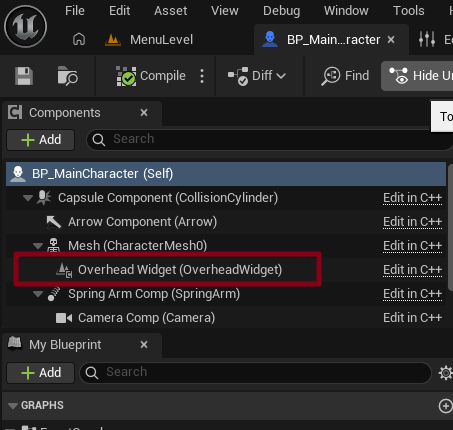
BP_MainCharacter 에 Overhead Widget이 잘 추가 되었습니다.
4️⃣ Character 클래스에서 WidgetComponent 위치 설정
- BP_MainCharacter 클래스에 들어가서 User Interface 카테고리에서 Widget Class를 WBP_HP로 설정해줍니다.

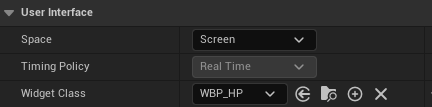
WBP_HP 를 보면서 위치 조정 할때는 Space를 잠시 World로 하면 됩니다. (수정 후 Screen으로 하셔야 합니다)
5️⃣ 캐릭터 사망하였을 시 처리 로직 추가
#include "MainCharacter.h"
#include "EnhancedInputComponent.h"
//#include "InputActionValue.h"
#include "MainPlayerController.h"

// 카메라, 스프링 암 실제 구현이 필요한 경우라서 include
// 전방 선언(Forward Declaration) 한것 여기서 (실질적으로 사용하는곳) 포함
#include "Camera/CameraComponent.h"
#include "GameFramework/SpringArmComponent.h"

//
#include "MainGameState.h"
#include "GameFramework/CharacterMovementComponent.h" // GetCharacterMovement() 사용을 위해
#include "GameFramework/Actor.h"
#include "Components/WidgetComponent.h"
#include "Components/TextBlock.h"
//#include "Kismet/GameplayStatics.h"

AMainCharacter::AMainCharacter()
{
	PrimaryActorTick.bCanEverTick = false;

	// (1) 스프링 암 생성
	SpringArmComp = CreateDefaultSubobject<USpringArmComponent>(TEXT("SpringArm"));
	// 스프링 암을 루트 컴포넌트 (CapsuleComponent)에 부착
	SpringArmComp->SetupAttachment(RootComponent);
	// 캐릭터와 카메라 사이의 거리 기본값 300으로 설정
	SpringArmComp->TargetArmLength = 300.0f;
	// 컨트롤러 회전에 따라 스프링 암도 회전하도록 설정
	SpringArmComp->bUsePawnControlRotation = true;


	//

	// (2) 카메라 컴포넌트 생성
	CameraComp = CreateDefaultSubobject<UCameraComponent>(TEXT("Camera"));
	// 스프링 암의 소켓 위치에 카메라를 부착
	CameraComp->SetupAttachment(SpringArmComp, USpringArmComponent::SocketName);
	// 카메라는 스프링 암의 회전을 따르므로 PawnControlRotation은 꺼둠
	CameraComp->bUsePawnControlRotation = false;

	OverheadWidget = CreateDefaultSubobject<UWidgetComponent>(TEXT("OverheadWidget"));
	OverheadWidget->SetupAttachment(GetMesh());
	OverheadWidget->SetWidgetSpace(EWidgetSpace::Screen);


	// Movements & Sprint Speed
	NormalSpeed = 600.0f;
	SprintSpeedMultiplier = 1.75f;
	SprintSpeed = NormalSpeed * SprintSpeedMultiplier;


	// #include "GameFramework/CharacterMovementComponent.h" 추가해야함
	// MaxWalkSpeed 변경시 캐릭터 이동속도가 즉시 변경
	GetCharacterMovement()->MaxWalkSpeed = NormalSpeed;


	// 초기 체력 설정
	MaxHealth = 100.0f;
	Health = MaxHealth;
}

void AMainCharacter::BeginPlay()
{
	Super::BeginPlay();
	UpdateOverheadHP();
}

// Called to bind functionality to input
void AMainCharacter::SetupPlayerInputComponent(UInputComponent* PlayerInputComponent)
{
	Super::SetupPlayerInputComponent(PlayerInputComponent);
	// Enhanced InputComponent로 캐스팅
    if (UEnhancedInputComponent* EnhancedInput = Cast<UEnhancedInputComponent>(PlayerInputComponent))
    {
        // IA를 가져오기 위해 현재 소유 중인 Controller를 AMainPlayerController로 캐스팅
        if (AMainPlayerController* PlayerController = Cast<AMainPlayerController>(GetController()))
        {
        	// null check
            if (PlayerController->MoveAction)
            {
                // IA_Move 액션 키를 "키를 누르고 있는 동안" Move() 호출
                EnhancedInput->BindAction(
                    PlayerController->MoveAction,
                    ETriggerEvent::Triggered,
                    this,
                    &AMainCharacter::Move
                );
            }

            if (PlayerController->JumpAction)
            {
                // IA_Jump 액션 키를 "키를 누르고 있는 동안" StartJump() 호출
                EnhancedInput->BindAction(
                    PlayerController->JumpAction,
                    ETriggerEvent::Triggered,
                    this,
                    &AMainCharacter::StartJump
                );

                // IA_Jump 액션 키에서 "손을 뗀 순간" StopJump() 호출
                EnhancedInput->BindAction(
                    PlayerController->JumpAction,
                    ETriggerEvent::Completed,
                    this,
                    &AMainCharacter::StopJump
                );
            }

            if (PlayerController->LookAction)
            {
                // IA_Look 액션 마우스가 "움직일 때" Look() 호출
                EnhancedInput->BindAction(
                    PlayerController->LookAction,
                    ETriggerEvent::Triggered,
                    this,
                    &AMainCharacter::Look
                );
            }

            if (PlayerController->SprintAction)
            {
                // IA_Sprint 액션 키를 "누르고 있는 동안" StartSprint() 호출
                EnhancedInput->BindAction(
                    PlayerController->SprintAction,
                    ETriggerEvent::Triggered,
                    this,
                    &AMainCharacter::StartSprint
                );
                // IA_Sprint 액션 키에서 "손을 뗀 순간" StopSprint() 호출
                EnhancedInput->BindAction(
                    PlayerController->SprintAction,
                    ETriggerEvent::Completed,
                    this,
                    &AMainCharacter::StopSprint
                );
            }
        }
    }

}

void AMainCharacter::Move(const FInputActionValue& value)
{
	// 컨트롤러가 있어야 방향 계산이 가능
	if (!Controller) return;

	// Value는 Axis2D로 설정된 IA_Move의 입력값 (WASD)을 담고 있음
	// 예) (X=1, Y=0) → 전진 / (X=-1, Y=0) → 후진 / (X=0, Y=1) → 오른쪽 / (X=0, Y=-1) → 왼쪽
	const FVector2D MoveInput = value.Get<FVector2D>();

	// IsNearlyZero
	// 부동소수점들은 딱 0으로 안 떨어 질 수도 있기 때문에 작은 오차들은 0으로 처리 하기 위한 함수
	if (!FMath::IsNearlyZero(MoveInput.X))
	{
		// 캐릭터가 바라보는 방향(정면)으로 X축 이동
		AddMovementInput(GetActorForwardVector(), MoveInput.X);
	}

	if (!FMath::IsNearlyZero(MoveInput.Y))
	{
		// 캐릭터의 오른쪽 방향으로 Y축 이동
		AddMovementInput(GetActorRightVector(), MoveInput.Y);
	}
}

void AMainCharacter::Look(const FInputActionValue& value)
{
	// 마우스의 X, Y 움직임을 2D 축으로 가져옴
	FVector2D LookInput = value.Get<FVector2D>();

	// X는 좌우 회전 (Yaw), Y는 상하 회전 (Pitch)
	// 좌우 회전
	AddControllerYawInput(LookInput.X);

	// 상하 회전
	// IA에서 반전해둔 상태
	// 여기엔 추후 변경 가능한 옵션 추가해주자
	AddControllerPitchInput(LookInput.Y);
}

void AMainCharacter::StartJump(const FInputActionValue& value)
{
	// Jump 함수는 Character가 기본 제공
	if (value.Get<bool>())
	{
		Jump();
	}
}
void AMainCharacter::StopJump(const FInputActionValue& value)
{
	// StopJumping 함수도 Character가 기본 제공
	if (!value.Get<bool>())
	{
		StopJumping();
	}
}

void AMainCharacter::StartSprint(const FInputActionValue& value)
{
	// Shift 키를 누른 순간 이 함수가 호출된다고 가정
	// 스프린트 속도를 적용
	if (GetCharacterMovement())
	{
		// 중간에 변경시
		SprintSpeed = NormalSpeed * SprintSpeedMultiplier;

		GetCharacterMovement()->MaxWalkSpeed = SprintSpeed;
	}

}
void AMainCharacter::StopSprint(const FInputActionValue& value)
{
	// Shift 키를 뗀 순간 이 함수가 호출
	// 평상시 속도로 복귀
	if (GetCharacterMovement())
	{
		GetCharacterMovement()->MaxWalkSpeed = NormalSpeed;
	}
}


float AMainCharacter::GetHealth() const
{
	return Health;
}

// 체력 회복 함수
void AMainCharacter::AddHealth(float  Amount)
{
	// 체력을 회복시킴. 최대 체력을 초과하지 않도록 제한함
	Health = FMath::Clamp(Health + Amount, 0.0f, MaxHealth);
	UpdateOverheadHP();
	//UE_LOG(LogTemp, Log, TEXT("Health increased to: %f"), Health);

	/*
	if (GEngine)
	{
		GEngine->AddOnScreenDebugMessage(
				-1, 2.f, FColor::Green,
				 TEXT("Health Increased to: %f"), Health);
	}*/
}

// 데미지 처리 함수
float  AMainCharacter::TakeDamage(float  DamageAmount, FDamageEvent const& DamageEvent, AController* EventInstigator, AActor* DamageCauser)
{
	// 기본 데미지 처리 로직 호출 (필수는 아님)
	int32 ActualDamage = Super::TakeDamage(DamageAmount, DamageEvent, EventInstigator, DamageCauser);

	// 체력을 데미지만큼 감소시키고, 0 이하로 떨어지지 않도록 Clamp
	Health = FMath::Clamp(Health - DamageAmount, 0.0f, MaxHealth);
	UpdateOverheadHP();
	//UE_LOG(LogTemp, Warning, TEXT("Health decreased to: %f"), Health);
	/*if (GEngine)
	{
		GEngine->AddOnScreenDebugMessage(
				-1, 2.f, FColor::Yellow,
				 TEXT("Health decreased to: %f"), Health);
	}
	*/

	// 체력이 0 이하가 되면 사망 처리
	if (Health <= 0.0f)
	{
		OnDeath();
	}

	// 실제 적용된 데미지를 반환
	return ActualDamage;
}

// 사망 처리 함수
void AMainCharacter::OnDeath()
{
	//UE_LOG(LogTemp, Error, TEXT("Character is Dead!"));
	/*if (GEngine)
	{
		GEngine->AddOnScreenDebugMessage(
				-1, 2.f, FColor::Red,
				 TEXT("Character is Dead!"));
	}*/

	AMainGameState* MainGameState = GetWorld() ? GetWorld()->GetGameState<AMainGameState>() : nullptr;
	if (MainGameState)
	{
		MainGameState->OnGameOver();
	}
}

void AMainCharacter::UpdateOverheadHP()
{
	if (!OverheadWidget) return;

	UUserWidget* OverheadWidgetInstance = OverheadWidget->GetUserWidgetObject();
	if (!OverheadWidgetInstance) return;

	if (UTextBlock* HPText = Cast<UTextBlock>(OverheadWidgetInstance->GetWidgetFromName(TEXT("OverHeadHP"))))
	{
		HPText->SetText(FText::FromString(FString::Printf(TEXT("%.0f / %.0f"), Health, MaxHealth)));
	}
}
#include "MainGameState.h"
#include "MainGameInstance.h"
#include "MainPlayerController.h"
#include "Kismet/GameplayStatics.h"
#include "SpawnVolume.h"
#include "CoinItem.h"
#include "Components/TextBlock.h"
#include "Blueprint/UserWidget.h"

AMainGameState::AMainGameState()
{
	Score = 0;
	SpawnedCoinCount = 0;
	CollectedCoinCount = 0;
	LevelDuration = 3.0f; // 한 레벨당 30초
	CurrentLevelIndex = 0;
	MaxLevels = 3;
}

void AMainGameState::BeginPlay()
{
	Super::BeginPlay();

	// 게임 시작 시 첫 레벨부터 진행
	StartLevel();

	//UpdateHUD();

	GetWorldTimerManager().SetTimer(
			HUDUpdateTimerHandle,
			this,
			&AMainGameState::UpdateHUD,
			0.1f,
			true
		);
}

int32 AMainGameState::GetScore() const
{
	return Score;
}

void AMainGameState::AddScore(int32 Amount)
{
	if (UGameInstance* GameInstance = GetGameInstance())
	{
		UMainGameInstance* MainGameInstance = Cast<UMainGameInstance>(GameInstance);
		if (MainGameInstance)
		{
			MainGameInstance->AddToScore(Amount);
		}
	}
}


void AMainGameState::StartLevel()
{
	if (APlayerController* PlayerController = GetWorld()->GetFirstPlayerController())
	{
		if (AMainPlayerController* MainPlayerController = Cast<AMainPlayerController>(PlayerController))
		{
			MainPlayerController->ShowGameHUD();
		}
	}


	if (UGameInstance* GameInstance = GetGameInstance())
	{
		UMainGameInstance* MainGameInstance = Cast<UMainGameInstance>(GameInstance);
		if (MainGameInstance)
		{
			CurrentLevelIndex = MainGameInstance->CurrentLevelIndex;
		}
	}

	// 레벨 시작 시, 코인 개수 초기화
	SpawnedCoinCount = 0;
	CollectedCoinCount = 0;
	// 현재 맵에 배치된 모든 SpawnVolume을 찾아 아이템 40개를 스폰
	TArray<AActor*> FoundVolumes;
	UGameplayStatics::GetAllActorsOfClass(GetWorld(), ASpawnVolume::StaticClass(), FoundVolumes);
	const int32 ItemToSpawn = 40;

	for (int32 i = 0; i < ItemToSpawn; i++)
	{
		if (FoundVolumes.Num() > 0)
		{
			ASpawnVolume* SpawnVolume = Cast<ASpawnVolume>(FoundVolumes[0]);
			if (SpawnVolume)
			{
				AActor* SpawnedActor = SpawnVolume->SpawnRandomItem();
				// 만약 스폰된 액터가 코인 타입이라면 SpawnedCoinCount 증가
				if (SpawnedActor && SpawnedActor->IsA(ACoinItem::StaticClass()))
				{
					SpawnedCoinCount++;
				}
			}
		}
	}
	// 30초 후에 OnLevelTimeUp()가 호출되도록 타이머 설정
	GetWorldTimerManager().SetTimer(
		LevelTimerHandle,
		this,
		&AMainGameState::OnLevelTimeUp,
		LevelDuration,
		false
	);
	/*UE_LOG(LogTemp, Warning, TEXT("Level %d Start!, Spawned %d coin"),
	       CurrentLevelIndex + 1,
	       SpawnedCoinCount);*/
}

void AMainGameState::OnLevelTimeUp()
{
	// 시간이 다 되면 레벨을 종료
	EndLevel();
}

void AMainGameState::OnCoinCollected()
{
	CollectedCoinCount++;

	/*UE_LOG(LogTemp, Warning, TEXT("Coin Collected: %d / %d"),
	       CollectedCoinCount,
	       SpawnedCoinCount)*/

	// 현재 레벨에서 스폰된 코인을 전부 주웠다면 즉시 레벨 종료
	if (SpawnedCoinCount > 0 && CollectedCoinCount >= SpawnedCoinCount)
	{
		EndLevel();
	}
}

void AMainGameState::EndLevel()
{

	// 타이머 해제
	GetWorldTimerManager().ClearTimer(LevelTimerHandle);
	// 다음 레벨 인덱스로
	//CurrentLevelIndex++;

	if (UGameInstance* GameInstance = GetGameInstance())
	{
		UMainGameInstance* MainGameInstance = Cast<UMainGameInstance>(GameInstance);
		if (MainGameInstance)
		{
			AddScore(Score);
			CurrentLevelIndex++;
			MainGameInstance->CurrentLevelIndex = CurrentLevelIndex;
		}
	}

	// 모든 레벨을 다 돌았다면 게임 오버 처리
	if (CurrentLevelIndex >= MaxLevels)
	{
		OnGameOver();
		return;
	}

	// 레벨 맵 이름이 있다면 해당 맵 불러오기
	if (LevelMapNames.IsValidIndex(CurrentLevelIndex))
	{
		UGameplayStatics::OpenLevel(GetWorld(), LevelMapNames[CurrentLevelIndex]);
	}
	else
	{
		// 맵 이름이 없으면 게임오버
		OnGameOver();
	}
}

void AMainGameState::OnGameOver()
{
	if (APlayerController* PlayerController = GetWorld()->GetFirstPlayerController())
	{
		if (AMainPlayerController* MainPlayerController = Cast<AMainPlayerController>(PlayerController))
		{
			MainPlayerController->SetPause(true);
			MainPlayerController->ShowMainMenu(true);
		}
	}

	//UpdateHUD();
	//UE_LOG(LogTemp, Warning, TEXT("Game Over!!"));

}

void AMainGameState::UpdateHUD()
{
	if (APlayerController* PlayerController = GetWorld()->GetFirstPlayerController())
	{
		AMainPlayerController* MainPlayerController = Cast<AMainPlayerController>(PlayerController);
		{
			if (UUserWidget* HUDWidget = MainPlayerController->GetHUDWidget())
			{
				// requires
				// #include "Components/TextBlock.h"
				// #include "Blueprint/UserWidget.h"

				//추후 변경 방안
				// UPROPERTY(meta = (BindWidget))
				// class UButton* MyAwesomeButton;
				if (UTextBlock* TimeText = Cast<UTextBlock>(HUDWidget->GetWidgetFromName(TEXT("Time"))))
				{
					float RemainingTime = GetWorldTimerManager().GetTimerRemaining(LevelTimerHandle);
					TimeText->SetText(FText::FromString(FString::Printf(TEXT("Time: %.1f"), RemainingTime)));
				}

				//
				if (UTextBlock* ScoreText = Cast<UTextBlock>(HUDWidget->GetWidgetFromName(TEXT("Score"))))
				{
					if (UGameInstance* GameInstance = GetGameInstance())
					{
						UMainGameInstance* MainGameInstance = Cast<UMainGameInstance>(GameInstance);
						if (MainGameInstance)
						{
							ScoreText->SetText(FText::FromString(FString::Printf(TEXT("Score: %i"), MainGameInstance->TotalScore)));
						}
					}
				}

				if (UTextBlock* LevelIndexText = Cast<UTextBlock>(HUDWidget->GetWidgetFromName(TEXT("Level"))))
				{
					LevelIndexText->SetText(FText::FromString(FString::Printf(TEXT("Level: %d"), CurrentLevelIndex + 1)));
				}
			}
		}
	}
}
#include "MainPlayerController.h"
#include "EnhancedInputSubsystems.h"
#include "EnhancedInputSubsystems.h" // Enhanced Input System의 Local Player Subsystem을 사용하기 위해 포함
#include "MainGameState.h"
#include "MainGameInstance.h"
#include "Blueprint/UserWidget.h"
#include "Kismet/GameplayStatics.h"
#include "Components/TextBlock.h"

// 어차피 블루프린트 상에서 전부 다 초기화를 하기 때문에 여기서는 전부 다 nullptr 처리
AMainPlayerController::AMainPlayerController()
	: InputMappingContext(nullptr),
	  MoveAction(nullptr),
	  JumpAction(nullptr),
	  LookAction(nullptr),
	  SprintAction(nullptr),
	  HUDWidgetClass(nullptr),
	  HUDWidgetInstance(nullptr),
	  MainMenuWidgetClass(nullptr),
	  MainMenuWidgetInstance(nullptr)

{
}

void AMainPlayerController::BeginPlay()
{
	Super::BeginPlay();

	// GetLocalPlayer():현재 PlayerController에 연결된 Local Player 객체를 가져옴
	// Local Player 는 그 플레이어의 입력이나 화면 뷰 같은 것을 관리하는 어떤 객체
	if (ULocalPlayer* LocalPlayer = GetLocalPlayer())
	{
		// Local Player에서 EnhancedInputLocalPlayerSubsystem을 획득
		// UEnhancedInputLocalPlayerSubsystem: 입력 시스템을 관리 (IMC 추가 혹은 삭제하는 역할)
		if (UEnhancedInputLocalPlayerSubsystem* Subsystem =
			LocalPlayer->GetSubsystem<UEnhancedInputLocalPlayerSubsystem>())
		{
			if (InputMappingContext)
			{
				// Subsystem을 통해 우리가 할당한 IMC를 활성화
				// 우선순위(Priority)는 0이 가장 높은 우선순위
				Subsystem->AddMappingContext(InputMappingContext, 0);
			}
		}
	}

	FString CurrentMapName = GetWorld()->GetMapName();
	if (CurrentMapName.Contains("MenuLevel"))
	{
		ShowMainMenu(false);
	}


	/*// HUD 위젯 생성 및 표시
	if (HUDWidgetClass)
	{
		HUDWidgetInstance = CreateWidget<UUserWidget>(this, HUDWidgetClass);
		if (HUDWidgetInstance)
		{
			HUDWidgetInstance->AddToViewport();
		}
	}

	AMainGameState* MainGameState = GetWorld() ? GetWorld()->GetGameState<AMainGameState>() : nullptr;
	if (MainGameState)
	{
		MainGameState->UpdateHUD();
	}*/
}

UUserWidget* AMainPlayerController::GetHUDWidget() const
{
	return HUDWidgetInstance;
}


// 메뉴 UI 표시
void AMainPlayerController::ShowMainMenu(bool bIsRestart)
{
	// HUD가 켜져 있다면 닫기
	if (HUDWidgetInstance)
	{
		HUDWidgetInstance->RemoveFromParent();
		HUDWidgetInstance = nullptr;
	}

	// 이미 메뉴가 떠 있으면 제거
	if (MainMenuWidgetInstance)
	{
		MainMenuWidgetInstance->RemoveFromParent();
		MainMenuWidgetInstance = nullptr;
	}

	// 메뉴 UI 생성
	if (MainMenuWidgetClass)
	{
		MainMenuWidgetInstance = CreateWidget<UUserWidget>(this, MainMenuWidgetClass);
		if (MainMenuWidgetInstance)
		{
			MainMenuWidgetInstance->AddToViewport();

			bShowMouseCursor = true;
			SetInputMode(FInputModeUIOnly());
		}

		if (UTextBlock* ButtonText = Cast<UTextBlock>(
			MainMenuWidgetInstance->GetWidgetFromName(TEXT("StartButtonText"))))
		{
			if (bIsRestart)
			{
				ButtonText->SetText(FText::FromString(TEXT("Restart")));


			}
			else
			{
				ButtonText->SetText(FText::FromString(TEXT("Start")));
			}
		}

		if (bIsRestart)
		{
			UFunction* PlayAnimFunc = MainMenuWidgetInstance->FindFunction(FName("PlayGameOverAnim"));
			if (PlayAnimFunc)
			{
				MainMenuWidgetInstance->ProcessEvent(PlayAnimFunc, nullptr);
			}

			if (UTextBlock* TotalScoreText = Cast<UTextBlock>(MainMenuWidgetInstance->GetWidgetFromName("TotalScoreText")))
			{
				if (UMainGameInstance* MainGameInstance = Cast<UMainGameInstance>(UGameplayStatics::GetGameInstance(this)))
				{
					TotalScoreText->SetText(FText::FromString(
						FString::Printf(TEXT("Total Score: %i"), MainGameInstance->TotalScore)
					));
				}
			}
		}
	}
}

// 게임 HUD 표시
void AMainPlayerController::ShowGameHUD()
{
	// HUD가 켜져 있다면 닫기
	if (HUDWidgetInstance)
	{
		HUDWidgetInstance->RemoveFromParent();
		HUDWidgetInstance = nullptr;
	}

	// 이미 메뉴가 떠 있으면 제거
	if (MainMenuWidgetInstance)
	{
		MainMenuWidgetInstance->RemoveFromParent();
		MainMenuWidgetInstance = nullptr;
	}

	if (HUDWidgetClass)
	{
		HUDWidgetInstance = CreateWidget<UUserWidget>(this, HUDWidgetClass);
		if (HUDWidgetInstance)
		{
			HUDWidgetInstance->AddToViewport();

			bShowMouseCursor = false;
			SetInputMode(FInputModeGameOnly());

			AMainGameState* MainGameState = GetWorld() ? GetWorld()->GetGameState<AMainGameState>() : nullptr;
			if (MainGameState)
			{
				MainGameState->UpdateHUD();
			}
		}
	}
}

// 게임 시작 - BasicLevel 오픈, GameInstance 데이터 리셋
void AMainPlayerController::StartGame()
{
	if (UMainGameInstance* MainGameInstance = Cast<UMainGameInstance>(UGameplayStatics::GetGameInstance(this)))
	{
		MainGameInstance->CurrentLevelIndex = 0;
		MainGameInstance->TotalScore = 0;
	}

	UGameplayStatics::OpenLevel(GetWorld(), FName("BasicLevel"));
	SetPause(false);
}
0
Conclustion
추천
UMG 위젯 애니메이팅 UE 공식 문서: https://dev.epicgames.com/documentation/unreal-engine/animating-umg-widgets-in-unreal-engine?lang=ko
Animating UMG Widgets in Unreal Engine | Unreal Engine 5.7 Documentation | Epic Developer Community
How to create animated UI elements in UMG in Unreal Engine.
dev.epicgames.com
UMG UI 디자이너 퀵스타트 가이드 UE 공식 문서: https://dev.epicgames.com/documentation/unreal-engine/umg-ui-designer-quick-start-guide-in-unreal-engine?lang=ko
UMG UI Designer Quick Start Guide in Unreal Engine | Unreal Engine 5.7 Documentation | Epic Developer Community
Getting started with using Unreal Motion Graphics in Unreal Engine.
dev.epicgames.com
[Unreal Engine/UE 기초] - 인터페이스 기반 아이템 클래스 설계하기 | [언리얼 엔진 C++ (Unreal Engine C++)]
인터페이스 기반 아이템 클래스 설계하기 | [언리얼 엔진 C++ (Unreal Engine C++)]
인터페이스 기반 아이템 클래스 설계하기 인터페이스 이해하기1️⃣ 인터페이스란?인터페이스 (Interface)란 클래스 (또는 오브젝트)가 반드시 구현해야 할 함수 목록만을 미리 정의해 두고, 실제
devcol.tistory.com
[Unreal Engine/UE 기초] - 충돌 이벤트로 획득되는 아이템 구현하기 | [언리얼 엔진 C++ (Unreal Engine C++)]
충돌 이벤트로 획득되는 아이템 구현하기 | [언리얼 엔진 C++ (Unreal Engine C++)]
충돌 이벤트로 획득되는 아이템 구현하기 이전 포스팅에서는 클래스 구조만 짜고 로직은 비여있던 상태.이전 포스팅: [Unreal Engine/UE 기초] - 인터페이스 기반 아이템 클래스 설계하기 | [언리얼
devcol.tistory.com
[Unreal Engine/UE 기초] - 아이템 스폰 및 레벨 데이터 관리하기 | [언리얼 엔진 C++ (Unreal Engine C++)]
아이템 스폰 및 레벨 데이터 관리하기 | [언리얼 엔진 C++ (Unreal Engine C++)]
아이템 스폰 및 레벨 데이터 관리하기 랜덤 위치에 아이템 스폰하기 1️⃣ 레벨 셋팅하기Resources 폴더에 Maps 폴더에는 3개의 레벨이 이미 존재합니다. 각각 난이도에 따라서 크기가 다른 맵이고,
devcol.tistory.com
[Unreal Engine/UE 기초] - 캐릭터 체력 및 점수 관리 시스템 구현하기 | [언리얼 엔진 C++ (Unreal Engine C++)]
캐릭터 체력 및 점수 관리 시스템 구현하기 | [언리얼 엔진 C++ (Unreal Engine C++)]
캐릭터 체력 및 점수 관리 시스템 구현하기 캐릭터 체력 시스템 구현하기 1️⃣ 캐릭터 클래스에 체력 변수 및 함수 선언PlayerState를 쓰지 않는 이유PlayerState: 각 플레이어마다의 어떤 정보를 관
devcol.tistory.com
[Unreal Engine/UE 기초] - 게임 루프 설계를 통한 게임 흐름 제어하기 | [언리얼 엔진 C++ (Unreal Engine C++)]
게임 루프 설계를 통한 게임 흐름 제어하기 | [언리얼 엔진 C++ (Unreal Engine C++)]
게임 루프 설계를 통한 게임 흐름 제어하기 GameState를 이용한 게임 루프 구현하기 게임루프: 보통 게임의 핵심적인 흐름을 얘기합니다. 즉 게임이 시작할 때부터 종료까지 수행하는 단계들게임
devcol.tistory.com
[Unreal Engine/UE 기초] - UI 위젯 설계와 실시간 데이터 연동하기 | [언리얼 엔진 C++ (Unreal Engine C++)]
UI 위젯 설계와 실시간 데이터 연동하기 | [언리얼 엔진 C++ (Unreal Engine C++)]
UI 위젯 설계와 실시간 데이터 연동하기 | [언리얼 엔진 C++ (Unreal Engine C++)] UMG (User Widget) 위젯 기초 디자인 이해하기 1️⃣ HUD (Heads-Up Display)란?HUD는 게임 내에서 플레이어에게 정보를 제공하기 위
devcol.tistory.com
[Unreal Engine/UE 기초] - 게임 흐름에 맞춘 메뉴 UI 구현하기 | [언리얼 엔진 C++ (Unreal Engine C++)]
게임 흐름에 맞춘 메뉴 UI 구현하기 | [언리얼 엔진 C++ (Unreal Engine C++)]
게임 흐름에 맞춘 메뉴 UI 구현하기 게임 메뉴 UI 디자인하기 1️⃣ 메뉴 위젯 생성하고 버튼 추가하기그동안은 게임 중에 나오는 위젯을 설계했다면, 이번에는 게임을 일시적으로 중단하고 시작
devcol.tistory.com
[페이지] Unreal Engine | 언리얼 엔진